
Struggling to turn website visitors into loyal customers feels familiar for many British businesses. User experience reaches far beyond a slick layout and instead shapes every impression, emotion, and interaction a customer has with your brand online. By understanding how UX influences engagement and trust, you can build a site that not only attracts attention but keeps it, putting your company ahead in a competitive digital marketplace.
| Point | Details |
|---|---|
| Understanding UX Importance | User Experience (UX) significantly affects customer retention and conversion rates, making it a core focus for businesses. |
| Core UX Components | A great UX balances system characteristics, user attributes, and context of use to ensure optimal interaction. |
| Types of User Experience | Ergonomic, cognitive, and emotional experiences collectively shape how users engage with your website. |
| Continuous Improvement | Regular testing and refinement based on user feedback are essential for enhancing UX and boosting business performance. |
User experience (UX) describes far more than whether your website works. It encompasses how visitors interact with your site, what they feel when using it, and whether they achieve their goals. UX is the complete journey a customer takes from the moment they land on your page until they complete an action—whether that is making a purchase, filling out a form, or reading your content.
The term UX was introduced in 1995 and has since evolved into a multidisciplinary field. It blends elements of psychology, design, engineering, and marketing. For small to medium-sized businesses, understanding UX means recognising that a beautiful website is only half the battle. A visually stunning site that frustrates visitors leaves money on the table.
UX extends beyond simple usability—the ease of clicking buttons or finding information. According to ISO 9241 standards, UX encompasses:
UX is not just about making things work; it’s about making users feel confident, valued, and understood throughout their journey.
Three fundamental elements shape UX on your site:
1. System Characteristics How your website functions. Load speed, navigation structure, and responsiveness across devices all matter. A slow website frustrates visitors. Confusing navigation sends them to competitors.

2. User Attributes Who your visitors are. Their age, technical skill level, familiarity with your industry, and what they are trying to accomplish. A property developer and a first-time homebuyer have different needs on the same website.
3. Context of Use Where and how people access your site. Are they browsing on mobile during their commute? Researching on desktop at work? Context shapes expectations and behaviour.
These three elements interact constantly. Great UX balances all three. Ignore any one, and your conversion rates suffer.
Here is a summary comparing the three core aspects of user experience and how they influence business performance:
| UX Aspect | User Impact | Consequence for Business |
|---|---|---|
| System Characteristics | Faster, smoother interaction | Higher retention, reduced frustration |
| User Attributes | Personalised, relevant experiences | Increased engagement, loyalty |
| Context of Use | Accessibility across environments | Broader reach, improved conversions |
When visitors land on your site, they form an opinion within seconds. Poor UX drives them away before they even see what you offer. Why UX design is crucial to get right directly impacts your bottom line through higher bounce rates, lower conversions, and damaged brand reputation.
For SME marketing managers, UX is not a luxury—it’s a competitive necessity. Your visitors compare your site against larger competitors. If your UX is poor, they assume your product or service is too.
Pro tip: Start by asking your customers why they struggle with your website. Real user feedback reveals UX problems you might miss, and fixing them costs far less than losing customers to competitors.
Not all user experiences are the same. Your website creates different types of experiences depending on what visitors are doing and how they interact with your content. Understanding these distinct types helps you design for what actually matters to your customers.
Digital UX can be classified into several key categories. Ergonomic, cognitive, and emotional types all influence how users perceive and interact with your site. Each type plays a distinct role in overall satisfaction.
Ergonomic Experience focuses on the physical interaction with your site. This includes:
When visitors can navigate without friction, they stay longer.
Cognitive Experience addresses mental effort. How much thinking must users do to accomplish their goal? Clear labelling, logical information architecture, and obvious call-to-action buttons reduce cognitive load. A confusing checkout process forces customers to think too hard, and they abandon their purchase.
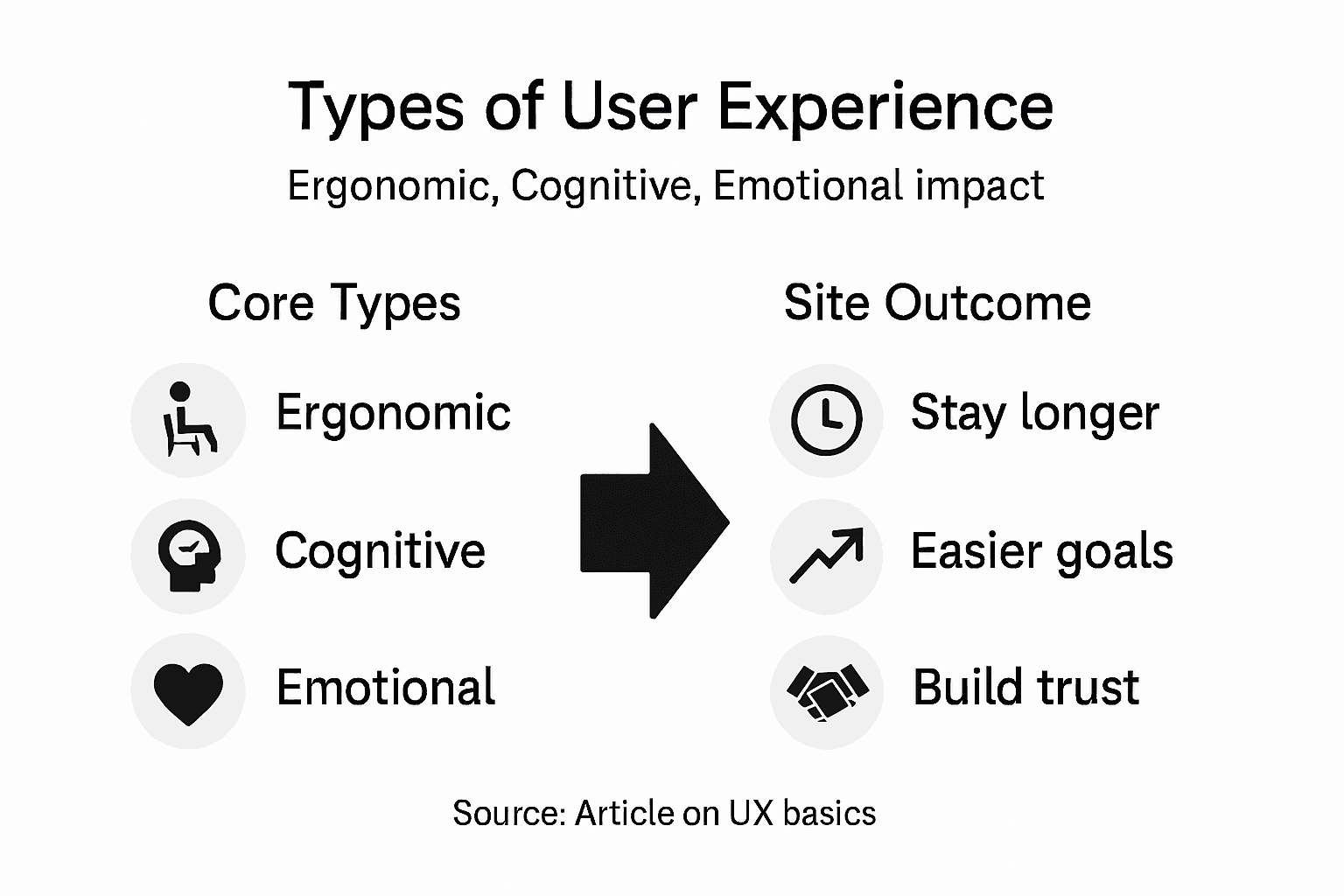
Emotional Experience is the feeling users have when interacting with your brand. Trust in web design shapes emotional response through colour, tone of voice, social proof, and visual hierarchy. A visitor who feels unsafe or unsure leaves immediately.
These three experience types don’t operate in isolation. They interact constantly on your site. A fast-loading page (ergonomic) with clear messaging (cognitive) and a trustworthy design (emotional) creates a complete positive experience.
Great digital UX balances all three dimensions simultaneously—making interaction effortless, understanding obvious, and trust built-in.
Consider an e-commerce checkout. The page must load quickly, buttons must be obvious, forms must be simple, and security badges must reassure customers. Fail at any one, and conversions drop.
Your website competitors are likely doing one or two of these well. The businesses winning market share excel at all three. Small improvements across each dimension compound into significantly better results.
A faster site (ergonomic) combined with clearer copy (cognitive) and trustworthy design (emotional) doesn’t just feel better—it converts better. Your bounce rate falls. Your time on page increases. Your customers complete their goals.
Pro tip: Test your website by watching a customer interact with it without guidance. Note where they hesitate, click wrong buttons, or express frustration—these reveal gaps in ergonomic, cognitive, or emotional experience that you can fix quickly.
Great UX doesn’t happen by accident. It requires deliberate choices grounded in understanding your users and testing your assumptions. The best websites aren’t built on guesswork—they’re built on research, strategy, and continuous refinement.
Successful UX design rests on five foundational pillars. Strategy, scope, structure, skeleton, and surface work together to create experiences that users genuinely want to return to. Each layer builds on the previous one.
You cannot design great UX without knowing who you’re designing for. This means:
When you skip user research, you design for yourself. Your customers pay the price through poor conversion rates.
Strategy defines why your website exists and what users need from it. What problems does your site solve?
Scope outlines the features, functions, and content required to meet those needs. What features actually matter?
Structure organises information logically. How should your navigation work? Where should key content live?
Skeleton is the wireframe—buttons, forms, and layouts that let users accomplish tasks. These small details and interactions shape how users move through your site.
Surface is the visual design—colour, typography, imagery. This is where emotion and trust are built.
Regardless of your industry, certain principles apply universally:
Accessible, consistent, and performant design isn’t a nice-to-have feature—it’s the foundation upon which conversions are built.
Small businesses often overlook accessibility and performance. Your larger competitors don’t. This gap is your opportunity.
Design is never finished. Prototyping and usability testing reveal what actually works versus what you think works. Watch real customers attempt tasks on your site. Where do they get stuck? What confuses them?
This feedback is invaluable. It guides iterations that compound into significantly better results over time.
Pro tip: Record sessions of users navigating your site without guidance, then identify where they hesitate or fail—these pain points are high-impact opportunities for UX improvements that directly increase conversions.
Great UX isn’t a nice design feature—it’s a business driver. Companies that invest in user experience see measurable returns through higher customer satisfaction, increased loyalty, and significantly improved conversion rates. For small to medium-sized businesses, this distinction matters enormously.
Your competitors are fighting for the same customers. The businesses winning market share aren’t doing so by accident. They’ve invested in understanding what their users actually want and building experiences that deliver it.
Effective user experience correlates strongly with business success by ensuring your website meets real customer needs. When you solve genuine problems, users stay longer, trust your brand more, and convert at higher rates.
Consider the impact across your business:
These aren’t theoretical benefits. Real businesses measure them daily.
A frustrating website doesn’t just lose visitors—it damages your brand reputation. When customers struggle to complete a purchase or find information, they assume your business is disorganised or unprofessional.
Poor UX also creates hidden costs. Confused visitors contact your team with questions. Your support team spends time answering questions a better-designed site would have answered automatically.
Bad UX is expensive, invisible taxation that drains profits whilst damaging your reputation. Good UX is an investment that compounds over time.
Customers decide within seconds whether they trust your brand. User-centric website design builds trust through consistency, clear communication, and professional presentation.
When your website feels polished and intuitive, visitors assume your products and services are equally high-quality. This psychological connection drives purchasing decisions.
The strongest argument for UX investment is measurement. Track these metrics:
Small UX improvements compound into significant business impact. A 2% improvement in conversion rate on a site receiving 10,000 monthly visitors means 200 additional conversions monthly.
Pro tip: Set up Google Analytics to track your current conversion rate, then implement one focused UX improvement—such as simplifying checkout or adding trust signals—and measure the impact within 30 days to quantify your ROI.
Most websites fail for the same reasons. Businesses rush their design, prioritise how things look over how they work, and skip testing with real users. These mistakes cost money whilst remaining invisible to the team building the site.
Understanding common pitfalls is your first defence against them. When you know what typically goes wrong, you can actively prevent it.
Aesthetic beauty without functionality is the cardinal sin. A visually stunning website that confuses visitors leaves money on the table. Your site needs to be both beautiful and usable.
Slow-loading pages frustrate visitors within seconds. Every additional second of load time increases bounce rate significantly. Speed matters as much as design.
Confusing navigation forces visitors to hunt for what they need. If your menu structure isn’t obvious or labels are vague, customers leave rather than explore.
Ignoring user needs entirely happens when designers build what they think users want rather than researching what users actually need. Overlooking user goals and alternative user flows in your planning stage leads to products that frustrate customers.
Mobile neglect is increasingly costly. More than half your traffic likely comes from mobile devices. A site that works on desktop but breaks on phones loses customers instantly.
Prevention is cheaper than repair. Implement these practices:
These practices prevent costly mistakes after launch.
Below is a comparison of common UX pitfalls and the recommended prevention strategies for each:
| Common Mistake | Typical Result | Prevention Strategy |
|---|---|---|
| Beauty over functionality | Users confused, high drop-offs | Prioritise usability testing |
| Slow-loading pages | Increased bounce rates | Optimise images, streamline code |
| Confusing navigation | Poor content discovery | Simplify menus, clarify labelling |
| Ignoring user needs | Solutions miss the mark | Conduct regular user research |
| Mobile neglect | Lost mobile traffic | Design for mobile first |
Often, poor UX doesn’t announce itself loudly. Your site might not be obviously broken, but visitors aren’t converting as expected. This signals a UX problem that requires investigation.
Bad UX is rarely obvious—it’s a thousand tiny friction points that compound. Good UX removes friction before visitors feel it.
Watch your customers. Record sessions. Ask direct questions. The answers reveal where your design fails them. Effective patterns that boost conversions emerge from understanding these real friction points, not from guessing.
The strongest UX teams test continuously. They treat assumptions as hypotheses to be proven rather than facts. This mindset prevents most pitfalls because problems surface quickly during testing rather than harming customers post-launch.
Pro tip: Identify your three most critical user journeys—such as signing up, checking out, or finding key information—then test each with five real users and document where they hesitate or fail, as these pain points have the highest impact on conversions.
Understanding that user experience goes beyond aesthetics to embrace functionality, emotional trust, and cognitive ease is just the first step. If your website struggles with slow load speeds, confusing navigation, or lacks mobile-first design, it is likely costing your business valuable customers and revenue. These common UX challenges outlined in the article highlight the critical importance of delivering a seamless journey that makes visitors feel confident, understood, and eager to engage.

Take control of your digital presence today with TWDA’s tailored web design and UI/UX development services. We specialise in creating visually appealing websites that perform flawlessly across all devices while prioritising your users’ needs and emotions. Don’t let poor usability or outdated design damage your brand. Explore how our expertise in custom web design, responsive development, and digital marketing can transform your online experience into increased conversions and lasting customer loyalty. Visit The Website Design Agency now and start turning every visitor into a satisfied customer.
User experience (UX) encompasses how visitors interact with a website, their feelings during this interaction, and whether they achieve their goals, such as making a purchase or finding information.
Good UX significantly impacts a business’s bottom line by reducing bounce rates, increasing conversion rates, improving customer satisfaction, and enhancing brand reputation.
The core components of UX include system characteristics (how the site functions), user attributes (who the visitors are), and the context of use (where and how users access the website).
Poor UX can lead to high bounce rates and low conversions, as visitors may become frustrated or confused, leading them to abandon the site before engaging with its content or offerings.